Quick notes on how to access and manipulate and registry of a Windows VM from vRealize Orchestrator. This is a bit messy and I plan to come back later and rewrite this!
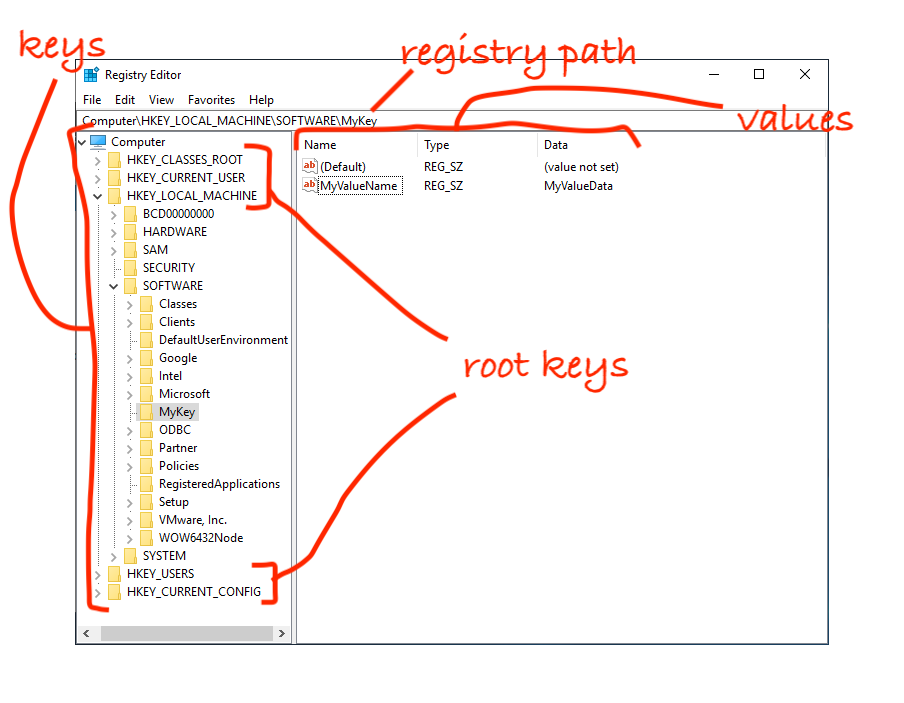
If you, like me, don't know much about Windows, the image above has some terminology regarding the registry. You can think of Keys as folders which contain Values or other Keys. Values have a Name, a Type, and Data. A Key which is contained by another Key is also referred to as a Subkey. Values do not need to have Data. All Keys contain a Value called Default. The top level Keys are also called Root Keys. Microsoft has a real write up here but this should get you through this blog post.
PREREQUISITES
- a vCenter managed Windows guest machine to manipulate
- credentials for an account on the Windows guest with permissions to perform read and write actions on the registry
- the vSphere vCenter Plug-In for vRO installed, and a connection to your vCenter configured. I'm using Plug-In version 7.0 in Orchestrator 8.4 for this blog post, but this should work for Plug-In version 6.0+ and Orchestrator 7.0+.
- it's worth having the vSphere API documentation for the objects we'll be using ready for reference. The vCenter Plug-In is just an interface to this API.
SETUP
Create a new VcVirtualMachine instance referring to the Windows machine you want. Here’s a simple way to do this by looking the machine up by name:
            var vmList = VcPlugin.getAllVirtualMachines(null, "ws2019");
            var vm = vmList[0];
Create a new VcNamePasswordAuthentication with the credentials for a user which has the permissions to do what you want to the registry:
var guestAuth = new VcNamePasswordAuthentication(false, "administrator", “P@ssw0rd!”);
I’ll show below what kind of errors result if the user specified doesn’t have enough permissions. The first boolean value in this setup determines if the session is interactive - in our case we don’t need this.
Create a new var to be a reference to the VM's guestWindowsRegistryManager:
var registryManager = vm.sdkConnection.guestOperationsManager.guestWindowsRegistryManager;
We can now use our registryManager and its functions to manipulate the registry. All functions provided by the registry manager require the VcVirtualMachine and VcNamePasswordAuthentication objects we created as parameters.
LISTING KEYS
The registry manager's listRegistryKeysInGuest will list all the Subkeys of a given Key. However, we have to define the Key in which to enumerate Subkeys as a VcGuestRegKeyNameSpec object. The two values you need to set are the registryPath and wowBitness, both as strings. They can also be provided as parameters to the constructor:
var guestRegKeyNameSpec = new VcGuestRegKeyNameSpec("HKLM", "WOWNative");
The registryPath is the full path to the key you want to enumerate subkeys in. This can be a root key like HKEY_LOCAL_MACHINE or any of the other root keys, or a subkey. It seems like these root keys can normally be abbreviated (HKEY_CURRENT_USER = HKCU, HKEY_CURRENT_CONFIG = HKCC, etc) but the only one that seems to actually work via this Plugin is HKEY_LOCAL_MACHINE’s abbreviation HKLM. Additionally, you must escape the \ character in the registry path (with another \), for example “HKEY_LOCAL_MACHINE\\SOFTWARE” rather than “HKEY_LOCAL_MACHINE\SOFTWARE”.
The three allowed values for the wowBitness are WOW32, WOW64 and WOWNative. See Microsoft's documentation here for a description of what this means.
Now that we have defined all the pieces necessary for the listRegistryKeysInGuest function, we can call it and iterate the results, which are an array of VcGuestRegKeyRecordSpecs:
            var vmList = VcPlugin.getAllVirtualMachines(null, "ws2019");

            var guestAuth = new VcNamePasswordAuthentication(false, "administrator", “P@ssw0rd!);

            var vm = vmList[0];

            var registryManager = vm.sdkConnection.guestOperationsManager.guestWindowsRegistryManager;

            var guestRegKeyNameSpec = new VcGuestRegKeyNameSpec("HKLM”, "WOWNative");
            var regKeyList = registryManager.listRegistryKeysInGuest(vm, guestAuth, guestRegKeyNameSpec);
            for each(regKey in regKeyList) {
                System.log("Key: " + regKey.key.keyName.registryPath);
            }
And the output:
            2022-07-03 19:28:13.823 +10:00info(com.mitnl.test/registryAccess) Key: HKLM\BCD00000000
            2022-07-03 19:28:13.824 +10:00info(com.mitnl.test/registryAccess) Key: HKLM\HARDWARE
            2022-07-03 19:28:13.825 +10:00info(com.mitnl.test/registryAccess) Key: HKLM\SAM
            2022-07-03 19:28:13.826 +10:00info(com.mitnl.test/registryAccess) Key: HKLM\SECURITY
            2022-07-03 19:28:13.827 +10:00info(com.mitnl.test/registryAccess) Key: HKLM\SOFTWARE
            2022-07-03 19:28:13.828 +10:00info(com.mitnl.test/registryAccess) Key: HKLM\SYSTEM
We have to go a few levels deep to get to the Key paths (regKey.key.keyName.registryPath) because the returned VcGuestRegKeyRecordSpec contains some sub-objects, more on this below.
Additionally, we can also provide a fourth, optional boolean parameter recursive to the listRegistryKeysInGuest function to step into each Subkey, and further Subkeys to return all Keys in the tree:
registryManager.listRegistryKeysInGuest(vm, guestAuth, guestRegKeyNameSpec, true);
Output:
            2022-07-03 19:32:01.974 +10:00info(com.mitnl.test/registryAccess) Key: HKLM\BCD00000000
            2022-07-03 19:32:01.975 +10:00info(com.mitnl.test/registryAccess) Key: HKLM\SECURITY
            2022-07-03 19:32:01.976 +10:00info(com.mitnl.test/registryAccess) Key: HKLM\SOFTWARE
            2022-07-03 19:32:01.977 +10:00info(com.mitnl.test/registryAccess) Key: HKLM\SOFTWARE\Microsoft\EAPSIMMethods\18\Identities
            2022-07-03 19:32:01.978 +10:00info(com.mitnl.test/registryAccess) Key: HKLM\SOFTWARE\Microsoft\EAPSIMMethods\23\Identities
            2022-07-03 19:32:01.979 +10:00info(com.mitnl.test/registryAccess) Key: HKLM\SOFTWARE\Microsoft\EAPSIMMethods\50\Identities
            2022-07-03 19:32:01.980 +10:00info(com.mitnl.test/registryAccess) Key: HKLM\SOFTWARE\Microsoft\Windows\CurrentVersion\AppModel\FileLaunchElevationBlockList
            (...etc...)
Note that if you list key recursively on a busy VM or via a busy vCenter, the listing can take longer than vRO's default timeout and fail.
Finally, you can filter the results with a final string parameter matchPattern:
registryManager.listRegistryKeysInGuest(vm, guestAuth, guestRegKeyNameSpec, true, “EAPS”);
Output:
            2022-07-03 19:36:27.425 +10:00info(com.mitnl.test/registryAccess) Key: HKLM\SOFTWARE\Microsoft\EAPSIMMethods
            2022-07-03 19:36:27.426 +10:00info(com.mitnl.test/registryAccess) Key: HKLM\SOFTWARE\Microsoft\WindowsRuntime\ActivatableClassId\Windows.Networking.UX.EAPSimIdentityInput
            2022-07-03 19:36:27.427 +10:00info(com.mitnl.test/registryAccess) Key: HKLM\SOFTWARE\WOW6432Node\Microsoft\EAPSIMMethods
LISTING VALUES
Similar to listing Keys, we can list the Values in a key with the listRegistryValuesInGuest function. It accepts the same parameters as listRegistryKeysInGuest, including recursive and matchPattern, with the returned results being an array of VcGuestRegValueSpecs:
            var guestRegKeyNameSpec = new” VcGuestRegKeyNameSpec(“HKLM\\SOFTWARE\\DefaultUserEnvironment”, “WOWNative”);
            var regValueList = regMgr.listRegistryValuesInGuest(vm, guestAuth, guestRegKeyNameSpec);
            for each (regValue in regValueList) {
                System.log("Name: " + regValue.name.name + " Data: " + regValue.data.value);
            }
Output:
            2022-07-03 20:25:25.872 +10:00info(com.mitnl.test/registryAccess) Name: Path Data: %USERPROFILE%\AppData\Local\Microsoft\WindowsApps;
            2022-07-03 20:25:25.873 +10:00info(com.mitnl.test/registryAccess) Name: TEMP Data: %USERPROFILE%\AppData\Local\Temp
            2022-07-03 20:25:25.874 +10:00info(com.mitnl.test/registryAccess) Name: TMP Data: %USERPROFILE%\AppData\Local\Temp
CREATING A NEW KEY
In creating a new Key, we yet again use the same objects as previously, except the registryPath in our VcGuestRegKeyNameSpec will be the path to the new Key:
            var targetKey = new VcGuestRegKeyNameSpec("HKLM\\SOFTWARE\\newKey", "WOWNative");

            registryManager.createRegistryKeyInGuest(vm, guestAuth, targetKey, false);
The fourth boolean parameter, isVolatile, must be set to ‘false’ if you want the key to persist after a reboot.
DELETING A KEY
Deleting a key works as you might expect after making it this far. targetKey is a VcGuestRegKeyNameSpec:
registryManager.deleteRegistryKeyInGuest(vm, guestAuth, targetKey);
CREATING A NEW VALUE
Creating a new value however is slightly more complex. The registry manager function is setRegistryValueInGuest which takes a VcGuestRegValueSpec. VcGuestRegValueSpec has a property name which is a VcGuestRegValueNameSpec. The VcGuestRegValueNameSpec has a property keyName, which is the key under which the new Value will be created, which is the familiar VcGuestRegKeyNameSpec. Finally the VcGuestRegValueNameSpec has a string property name, which is the name of the Value to be created.
Setting that chain up from scratch looks something like this:
            var newValue = new VcGuestRegValueSpec();
            newValue.name = new VcGuestRegValueNameSpec();
            newValue.name.keyName = new VcGuestRegKeyNameSpec("HKLM\\SOFTWARE\\newKey", "WOWNative");
            newValue.name.name = "NEWVALNAME";
The VcGuestRegValueSpec also has a data property. This property must be one of the classes which extend VcGuestRegValueDataSpec and determine the data type of the registry Value:
- GuestRegValueDwordSpec
- GuestRegValueQwordSpec
- GuestRegValueStringSpec
- GuestRegValueExpandStringSpec
- GuestRegValueMultiStringSpec
- GuestRegValueBinarySpec
            newValue.data = new VcGuestRegValueStringSpec();
            newValue.data.value = "NEWVALDATA";
We can now use the newValue object:
registryManager.setRegistryValueInGuest(vm, guestAuth, newValue);The VcGuestRegValueNameSpec’s name property can be an empty string. If this is the case, then the operation will occur on the Default value for the key specified.
You also use this function to update (overwrite) existing Values.
DELETING A VALUE
Finally, deleting a value uses the function deleteRegistryValueInGuest which takes a VcGuestRegValueNameSpec, which as seen above needs a VcGuestRegKeyNameSpec in addition to the Value name. Both can specified in the constructor:
            var targetKey = new VcGuestRegKeyNameSpec("HKLM\\SOFTWARE\\newKey", "WOWNative");
            var delValue = new VcGuestRegValueNameSpec(targetKey, “NEWVALNAME”);

            registryManager.setRegistryValueInGuest(vm, guestAuth, delValue);
OTHER NOTES
Using the vSphere API to access the guest uses VMware Tools, which is unreliable. You should wrap all of these commands in a try-catch structure and a loop if you want to retry a few times.